Posts

Showing posts with the label b3d

Franky

Image
 This was sculpted in Blender and textured/rendered in Lighwave3D. I feel he needs a full body and hopefully I can get around to it one of these days :) I also 3D printed him out, the failed section adds to the character

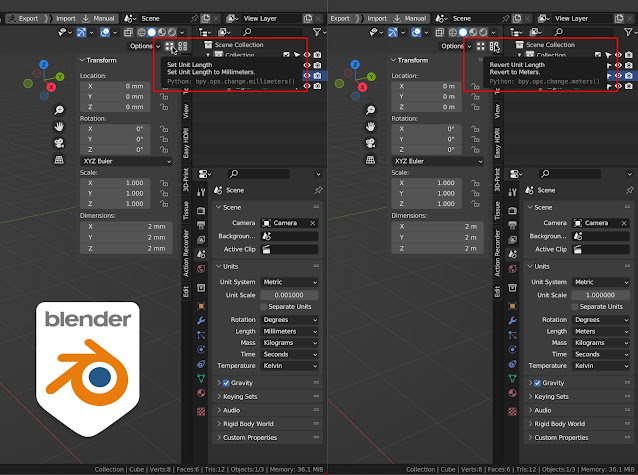
Blender Addon:- Meters to Millimeters V1.0

Image
 This is my first Blender Addon. Simple but useful addon if you use Blender3D for 3D Printing With one button click, you can change the Blender Units to millimeters, the grid size and also the camera clipping distance. Perfect way to check your models before exporting for 3D printing.  The second button reverts everything back to the default settings. To install: Download the free Addon from my Ko-fi page , unzip and install as you usually do from within Blender Requirements: Blender 3D 2.81 or newer

Yogi bear: Fall Guys

Image
This is fun. Reworked the hands and feet on this one :)  

Dino: The Fall Guys

Image
  Thought I'd turn Dino into a Fall Guys costume :)

WireFrame add-on for Blender

Image
Blender is getting better and easier to use with each update but some things are still old school, like the Freestyle feature. Activate Freestyle here, edit settings in another panel & individually mark edges on each object etc. etc. This is easy how rendering wireframes should be :) The line width & line colour are hard coded so far. If you know how to add those features let me know...cheers

Flintstones Dino: Turntable

Image
Here's the finished turntable of Dino :)

Flintstones Dino: Final

Image
Finally finished off Dino. I worked on the feet, adding a paw but it never looked right so the best option was to just add the claws :)

Flintstones Dino Wip4

Image
Changed the colour, did the hands & added the legs. I'm also finding the renders in Blender are not blotchy like you get in Lightwave 3D. Anyway, almost done.

Flintstones Dino Wip3

Image
Took a break from the modelling to focus on the shading & lighting in Blender , which is a whole different level of confusing. I manually added an HDRI map but it was difficult to get right, then I found Easy HDRI addon, it's a brilliant tool...get it if you haven't already :) Speaking of learning Blender , check these two YouTube channels out: Steven Scott & Grant Abbitt super cool stuff.

Flintstones Dino Wip2

Image
I redid Dino but with his eyes sitting on his head. Blender 2.81 is getting easier with each use but some things are annoying, like activating a feature in one place & editing it's proprieties somewhere else. The materials concept in Blender is also confusing. I keep applying the wrong materials to the wrong parts when I just want to edit some attributes.  I wish Blender had an incidence gradient like Lightwave3D . Maybe I need to find a good Toon Shader & I can see how it works. Anyway, that's enough of my Blender progress. Enjoy the images, rendered in Lightwave3D because...well... Blender noob here :)

Flintstones Dino Wip

Image
It's been a long time but hopefully I'll be more active from now on :) I started using Blender 2.8.1 for the first time, I do miss my incidence gradients from Lightwave3D etc. The move, rotate & resize tools are a bit strange (more complicated to use?), the shading is not as simple. The thing that got me into Blender was the Poly Build tool, which is super cool. Sorry for the crappy renders, but hopefully they'll improve as I get comfortable with the software.